
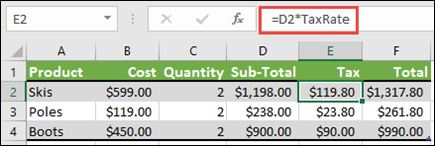
You can apply a named range to an existing formula. This is particularly helpful when you want to replace cell references with named ranges to make formulas easier to manage and understand. For example, you can define a named range called TaxRate with a value of 10% and use =D2*TaxRate to calculate the tax on a purchase.
Note
The procedure in Insert a named range into a formula in Excel explains how to insert a named range when you create a formula. This article explains how to apply an existing named range to a formula.
- Select the cell that contains the formula.
- Select Formulas > Define Name > Apply Names.
- In the Apply Names dialog box, select one or more named ranges that you want to apply.
- Select OK.
See also
Define and use names in formulas